GUI creation with XAD
An XAD user interface is composed of windows that can be opened or closed. Each window may contain any number of XAD objects such as lists, buttons, checkboxes, etc. Every window as well as every XAD object has a unique integer identifier (referred to as id) associated with it. The identifier is associated with the graphical object at creation and is henceforth used to refer to the respective object later in the program/model.
When the user interacts with an XAD object, events are generated. For example pressing a button generates an XAD_EVENT_PRESSED; selecting an item in a list generates an XAD_EVENT_SELECTION event. Events are processed in a callback routine written by the user. The behavior of the user interface is determined by how the application responds to events. Any Mosel code can be written for dealing with an event, including XAD statements for altering the state of the user interface. This allows great flexibility in dealing with Mosel data as well as interacting with the GUI.
A simple example will demonstrate the principles of creating and managing an XAD user interface. Suppose we want to write a Mosel program which displays a window asking for a number that is needed later in the model:

Figure 3.1: Simple input window example
Let's examine the code:
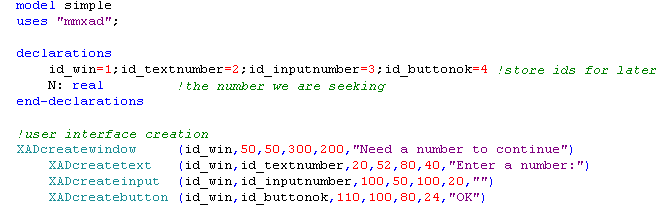
First we create a window and assign the id id_win to it. Then we create three XAD objects: a descriptive text, an input field and a button, each with a different id. The ids should be longer rather than shorter and they should provide type information to make the model more readable and maintainable.
Next:
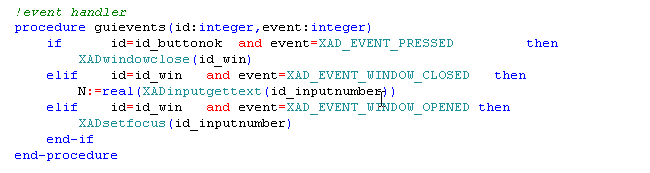
The event handler is the core of an XAD program. All the interaction between the user and the GUI is reflected through the event handler. The event handler is a callback procedure that takes two arguments of type integer. XAD will call this procedure when an event occurs. The arguments are:
| id: | integer | The id of the XAD object that generated the event |
|---|---|---|
| event: | integer | A number which denotes an event (e.g. XAD_EVENT_PRESSED) |
Note that some events such as key presses and list selections carry textual information. If this information is needed, it can be retrieved in the event handler using the routine XADgeteventtext: string
In our simple case, if the object id_buttonok is pressed then we close the window. When the window is closed, the text currently in the input object id_inputnumber is converted to a real number and assigned to N. Thirdly, for improved user interaction, we set the focus on the input object as soon as the window is opened.
Finally:
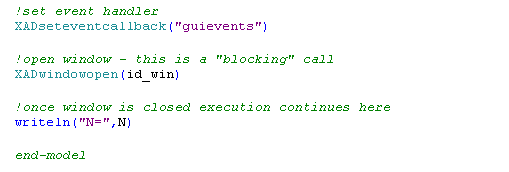
The procedure which handles the events (the event handler) must be registered with XAD by calling XADseteventcallback with the event handler procedure name as the sole argument.
Once the event handler is in place we can open (show) the window. When closing the window (by pressing the OK button or clicking the close button or pressing Esc), Mosel will resume its execution from the statement immediately following XADwindowopen.
If you have any comments or suggestions about these pages, please send mail to docs@dashoptimization.com.